DRF API
This chapter covers the optional JSON API over Django REST Framework.
Example app: drf_example (Product and Article ViewSets at /api/).
Enable djcrud[drf], add the DRF apps to INSTALLED_APPS, and merge API
URLs in urls.py. add_perm() rules
from Permissions apply to HTML views and DRF ViewSets — one ruleset for
both surfaces.
HTML CRUD is covered in Routing; this chapter is API-only.
djcrud_drf ships with the core djcrud package; third-party deps install
via the [drf] extra.
With django.contrib.admin installed (and optionally djcrud_history),
ModelViewSet writes LogEntry rows on create, update,
and delete — the same audit trail as HTML CRUD. Entries appear on each model’s
history view with no extra ViewSet code. Set log_actions = False on a
ViewSet to disable logging.
Install
pip install --pre "djcrud[drf]"
The extra pins djangorestframework and drf-spectacular to versions known
to work with djcrud. Add the apps and merge API URLs:
# settings.py
INSTALLED_APPS += [
    "rest_framework",
    "drf_spectacular",
    "djcrud_drf",
    "djcrud_example.drf_example",  # tutorial app; use your own app in production
]
# urls.py
import djcrud
import djcrud_drf

urlpatterns = (
    djcrud.site.build().urlpatterns
    + djcrud_drf.site.build().urlpatterns
)
Define a ModelViewSet
Subclass ModelViewSet, set model, and register on
djcrud_drf.site from the app’s djcrud.py module (autoloaded by
djcrud.Site.build()):
import djcrud_drf
from .models import Product

class ProductViewSet(djcrud_drf.ModelViewSet):
    model = Product

djcrud_drf.site.register(ProductViewSet)
That is the full CRUD setup — list, create, retrieve, update, and destroy at
/api/product/ with permissions from add_perm() on the same
model.
Custom actions use @action on the ViewSet; register permission rules with
add_perm() using the action name as the shortcode (see
publish below).
Example app
djcrud_example.drf_example registers ProductViewSet and ArticleViewSet
in djcrud.py. djcrud.Site.build() imports that module;
djcrud_drf.DrfSite.build() wires the ViewSets at /api/:
import djcrud
import djcrud_drf
from djcrud.permissions import authenticated, is_owner
from djcrud_example.views_example.models import Article
from rest_framework.decorators import action
from rest_framework.response import Response

from .models import Product


class ProductViewSet(djcrud_drf.ModelViewSet):
    model = Product


djcrud_drf.site.register(ProductViewSet)


def can_publish(user, *, obj, **ctx):
    if not user.is_authenticated:
        return False
    if obj is not None and (not is_owner(user, obj=obj, **ctx) or obj.published):
        return False
    return True


class ArticleViewSet(djcrud_drf.ModelViewSet):
    model = Article

    @action(detail=True, methods=["post"])
    def publish(self, request, pk=None):
        article = self.get_object()
        article.publish()
        return Response(self.get_serializer(article).data)


djcrud.permissions.add_perm(Article, "view,add,change,delete", check=authenticated)
djcrud.permissions.add_perm(Article, "publish", check=can_publish)
djcrud_drf.site.register(ArticleViewSet)
Uncomment the DRF URL merge in djcrud_example/urls.py when running the
example project locally.
Moving pieces
Piece |
Role |
|---|---|
|
|
|
Registers a ViewSet on the API router |
|
CRUD ViewSet with |
|
Login and token HTML routes from |
|
DRF |
OpenAPI
When drf-spectacular is installed:
GET /api/schema/— OpenAPI 3 schema (CRUD ViewSets andPOST /api/login/)GET /api/docs/— Swagger UI
Configure Bearer auth for the schema (and SPA client generators in SPA shell):
import djcrud_drf

SPECTACULAR_SETTINGS = djcrud_drf.spectacular_settings()
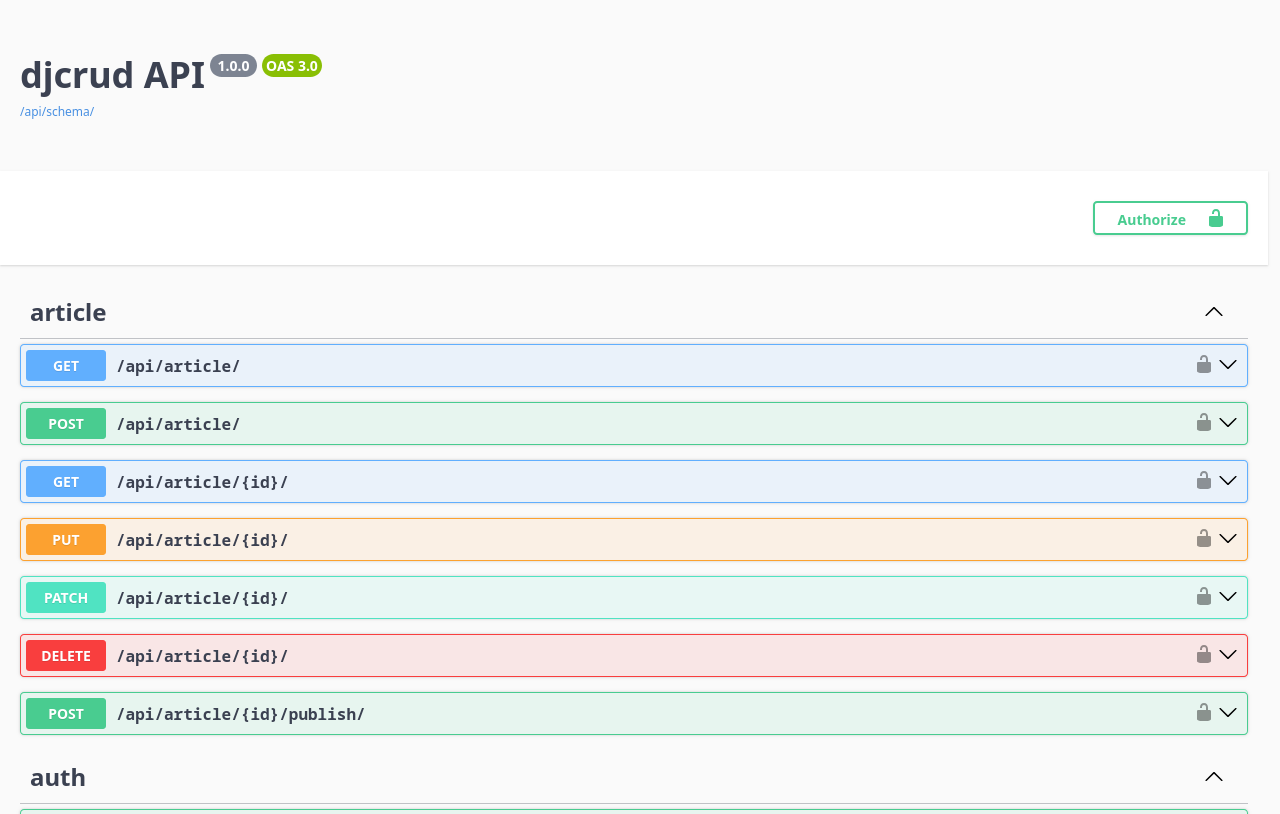
/api/docs/ after enabling djcrud[drf].
Optional Bearer token support
When API clients need Bearer authentication (HTML token UI plus /api/login/),
add djcrud_api and the Bearer middleware — not part of the core install
(see Install djcrud):
INSTALLED_APPS += ["djcrud_api"]

MIDDLEWARE = [
    ...
    "djcrud_api.middleware.BearerCsrfMiddleware",      # before CsrfViewMiddleware
    ...
    "djcrud_api.middleware.BearerUserMiddleware",      # after AuthenticationMiddleware
    ...
]
POST /api/login/ is a DRF view documented in the OpenAPI schema. Token
management HTML routes register on djcrud_drf.router. See
djcrud_api for token model details.
Obtain and use a token:
curl -X POST http://localhost:8000/api/login/ \
  -H 'Content-Type: application/json' \
  -d '{"username": "su", "password": "su"}'
curl http://localhost:8000/api/product/ \
  -H 'Authorization: Bearer <token>'
Reference
djcrud_drf — ViewSet API surface and
spectacular_settings()djcrud_api — Bearer tokens and
POST /api/login/Agents (MCP bridge) — stdio MCP tools from the same OpenAPI schema
djcrud_mcp — MCP bridge reference
SPA shell — SPA shell and OpenAPI client codegen